Ransomware is a type of malware that encrypts files and demands a ransom to decrypt them. It targets both businesses and individuals. Typically, cybercriminals demand to be paid in Bitcoins or other cryptocurrencies and ransomware victims cannot access, use files unless a ransom is paid.
What is HelloKitty?
HelloKitty ransomware targets businesses (companies), one of the known victims is the Cyberpunk 2077 developer CD Project. This ransomware renames encrypted files. It appends the “.crypted” extension to their filenames. For example, it renames “1.jpg” to “1.jpg.crypted“, “2.jpg” to “2.jpg.crypted“, and so on. HelloKitty also creates the “read_me_unlock.txt” file (ransom note) that it drops among encrypted files (in all directories that contain encrypted data). Ransom note name and the text in it may change depending on the attacked victim (company).
https://scriptkiddie.gq/
Screenshot of a message encouraging users to pay a ransom to decrypt their compromised data:

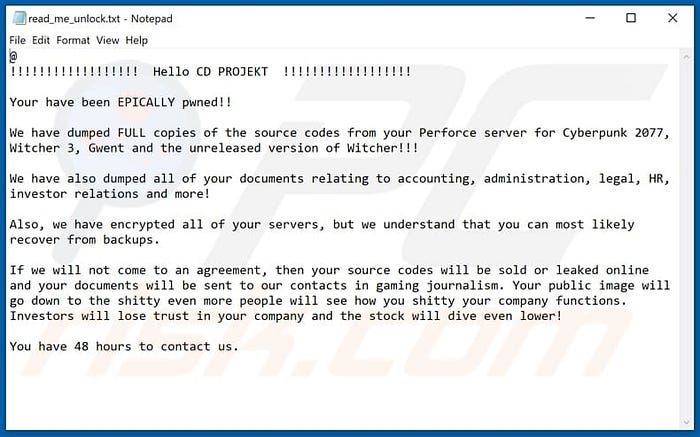
To summarize, This is a typical ransomware that encrypts files and prevents victims from using (accessing) encrypted files unless they pay a ransom. Typically, malware of this type creates or displays a ransom note that contains contact, payment information, and some other details. What usually makes ransomware attacks different is the price of decryption (amount of Bitcoin or other cryptocurrency) that the attackers request to be paid and the encryption algorithm that their ransomware uses to encrypt files. In one way or another, most ransomware victims can recover files for free only if they have data backups. Therefore, it is strongly recommended to create data backups regularly and store them on a remote server (e.g., Cloud) or unplugged storage device. More ransomware examples are Con30, Wcg, and Text.
How HelloKitty Works ?
While still somewhat unclear, current intelligence indicates that the primary delivery method of HelloKitty binaries is via phish email or via secondary infection in conjunction with other malware.
Once launched, HelloKitty will attempt to disable and terminate a number of processes and services so as to reduce interference with the encryption process. This includes processes and services associated with IIS, MSSQL, Quickbooks, Sharepoint, and more. These actions are carried out via taskkill.exe and net.exe.
As this Malware is on its early stage and it lacks the sophistication of some of the more well-known families such as Ryuk, REvil, and Conti, it has nevertheless struck some notable targets, including CEMIG0. That means it performs its action in non-stealth manner victim can identify that something is definitely wrong. I have also discussed below why its not that stealthy as compare to their well-known family members.
In the analyzed sample, this is all done in a very non-stealthy manner. All spawned CMD windows are in the foreground and fully visible. This ‘lack of discreteness’ is a typical for modern ransomware, or any successful malware, for that matter.

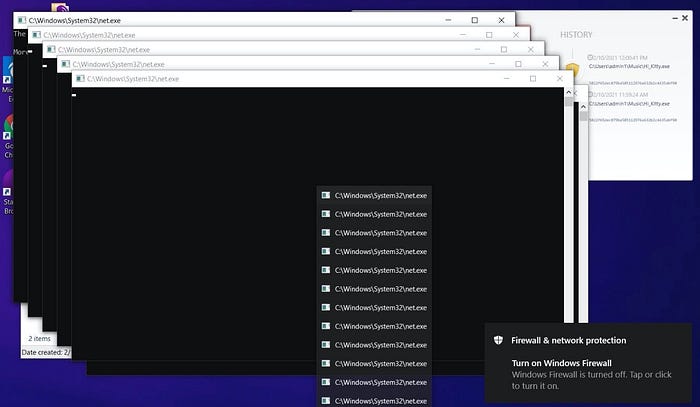
A full list of processes from the analyzed sample are listed below:
dsa*
Ntrtsca
ds_moni
Notifie
TmListe
iVPAgen
CNTAoSM
IBM*
bes10*
black*
robo*
copy*
store.e
sql*
vee*
wrsa*
wrsa.ex
postg*
sage*
MSSQLServerADHelper100
MSSQL$ISARS
MSSQL$MSFW
SQLAgent$ISARS
SQLAgent$MSFW
SQLBrowser
ReportServer$ISARS
SQLWriter
WinDefend
mr2kserv
MSExchangeADTopology
MSExchangeFBA
MSExchangeIS
MSExchangeSA
ShadowProtectSvc
SPAdminV4
SPTimerV4
SPTraceV4
SPUserCodeV4
SPWriterV4
SPSearch4
IISADMIN
firebirdguardiandefaultinstance
ibmiasrw
QBCFMonitorService
QBVSS
QBPOSDBServiceV12
"IBM Domino Server(CProgramFilesIBMDominodata)"
"IBM Domino Diagnostics(CProgramFilesIBMDomino)"
"Simply Accounting Database Connection Manager"
QuickBooksDB1
QuickBooksDB2
QuickBooksDB3
QuickBooksDB4
QuickBooksDB5
QuickBooksDB6
QuickBooksDB7
QuickBooksDB8
QuickBooksDB9
QuickBooksDB10
QuickBooksDB11
QuickBooksDB12
QuickBooksDB13
QuickBooksDB14
QuickBooksDB15
QuickBooksDB16
QuickBooksDB17
QuickBooksDB18
QuickBooksDB19
QuickBooksDB20
QuickBooksDB21
QuickBooksDB22
QuickBooksDB23
QuickBooksDB24
QuickBooksDB25
Additional processes and services that are terminated are identified via PID. For example:
taskkill.exe /f /PID "8512"
taskkill.exe /f /PID "8656"
Encryption
Encryption is initiated and completed very quickly once applicable services and processes have been terminated. Specific encryption recipes and routines can vary across variants of HelloKitty. Generally speaking, they tend to use a combination of AES-256 & RSA-2048 or even NTRU+AES-128.
Once encrypted, affected files receive the .crypted extension.
Screenshot of a ransom note (“read_me_ldk.txt“) used in other HelloKitty attack:

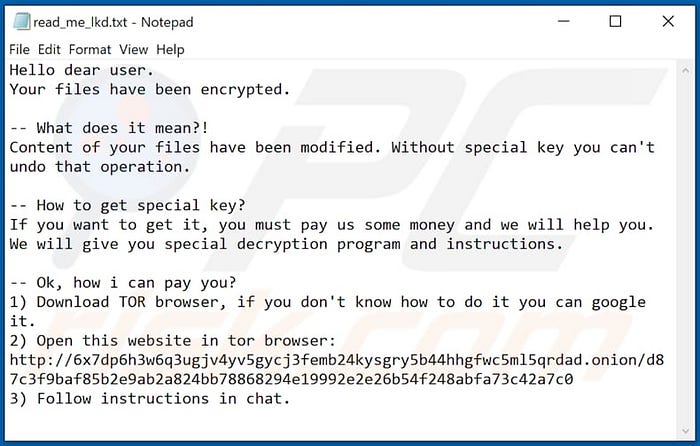
NOTE: It is important to note that as of this writing, the onion address associated with HelloKitty ransom notes is not active.
6x7dp6h3w6q3ugjv4yv5gycj3femb24kysgry5b44hhgfwc5ml5qrdad.onion
Instant automatic malware removal:
Manual threat removal might be a lengthy and complicated process that requires advanced computer skills. Malwarebytes is a professional automatic malware removal tool that is recommended to get rid of malware.
You can download Malwarebytes from their Official site or by just clicking here.
HelloKitty may be easier to spot than other modern ransomware families, but upon execution it is no less dangerous. There are currently no known ‘weaknesses’ in the encryption routines, and there are no thirdy-party decrypters available for the HelloKitty ransomware. Therefore, the only true defense is prevention. While this family does not appear to be actively leaking victim data at the moment, that could change at any point, in addition to them choosing to adopt some of the more recent extortion methods that go along with ransomware (DDoS).